A cash flow forecast template is a simple spreadsheet that shows how much cash you expect to come in and go out each week or month, so you can see a shortfall before it happens.
You finish a big job, the invoice is out, and on paper it was a great month. Then the supplier bill, the van payment and the tax set-aside all land in the same week, and the customer still hasn't paid. A cash flow forecast shows you that week a month in advance, while you still have time to do something about it.
Key takeaways
- A cash flow forecast tracks when money actually reaches and leaves your bank, week by week.
- 13 weeks (one quarter) is close enough to be realistic and long enough to spot a gap.
- Set a minimum cash buffer, and act as soon as a week drops below it.
- Update it every week: replace the forecast with what really happened.
Download the Free Cash Flow Forecast Template
Want 5 more quick wins like this one, for free? The 5 Quick Wins guide shows you how to stop missing calls, get more reviews and save hours every week.
Get the free guide ↓No email required. The Excel and Google Sheets versions have two forecasts:
- 13-Week Forecast: your cash, week by week, for the next quarter.
- 12-Month Forecast: the bigger picture, month by month, for slow seasons, big purchases and taxes.
Type your starting cash and the minimum you want to keep in the bank. Every total, every ending balance and a status line (OK, LOW or SHORT) calculate on their own, and any week that drops below your minimum turns red. The PDF is blank, for filling in by hand.
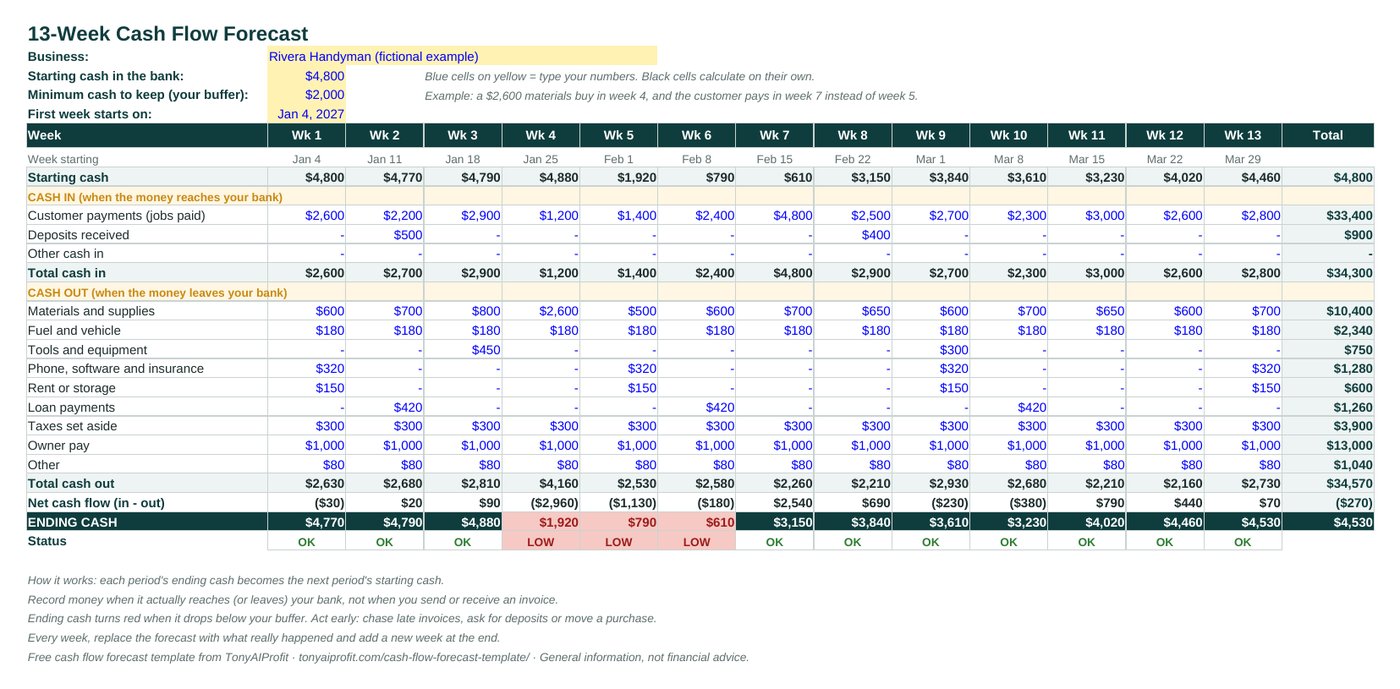
What Is a 13-Week Cash Flow Forecast?
A 13-week cash flow forecast is a week-by-week plan of the cash you expect to receive and pay out over the next quarter. Thirteen weeks is short enough that your numbers are realistic, and long enough to see a cash gap coming while you still have time to fix it.
It's different from your profit and loss statement. A profit and loss statement tells you whether the business made money. A cash flow forecast tells you when the money arrives and leaves, which is what decides whether you can pay your bills next Friday.
How to Create a Cash Flow Forecast in Excel
To create a cash flow forecast in Excel, start with the cash in your bank today. For each week, add the money you expect to receive and subtract the money you expect to pay out. The result is your ending cash, which becomes next week's starting cash. Update it every week so you spot shortages early.
The template does the math. Here's what goes in each part.
1. Starting cash
The money in your business bank account today. Only the first week needs it; after that, each week starts with the previous week's ending cash.
2. Cash in
Payments from customers, deposits for upcoming jobs and any other money coming in. Put each payment in the week it will actually reach your bank, not the week you send the invoice. If a customer usually pays two weeks late, forecast it two weeks late.
3. Cash out
Everything that leaves your account: materials, fuel, tools, phone and software, insurance, rent or storage, loan payments, the money you set aside for taxes, and what you pay yourself. Owner pay belongs here. If you leave it out, the forecast looks better than your real life.
4. Ending cash and your buffer
Ending cash = starting cash + cash in − cash out. Then compare it with your minimum buffer, the amount you never want to drop below. Any week under the buffer is a warning, and any week below zero is a bill you can't pay.
5. Keep it rolling
At the end of each week, replace the forecast with the real numbers and add a new week at the end, so you always see 13 weeks ahead.
Example: A Filled 13-Week Cash Flow Forecast (Fictional)
Here's Rivera Handyman (fictional example), a one-person business, in weeks 4 to 7 of the template. In week 4, Alex Rivera buys $2,600 of materials for a bathroom job. The customer was supposed to pay in week 5, but pays in week 7.
| Week 4 | Week 5 | Week 6 | Week 7 | |
|---|---|---|---|---|
| Starting cash | $4,880 | $1,920 | $790 | $610 |
| Cash in | $1,200 | $1,400 | $2,400 | $4,800 |
| Cash out | $4,160 | $2,530 | $2,580 | $2,260 |
| Ending cash | $1,920 | $790 | $610 | $3,150 |
| Status (buffer $2,000) | LOW | LOW | LOW | OK |
The job was profitable. But for three weeks, Alex had less than $2,000 in the bank, and one more surprise bill would have meant paying late. With the forecast, he would have seen this a month earlier and could have:
- asked for a bigger deposit before buying the materials;
- sent a polite reminder the day the invoice was due (here are payment reminder messages you can copy);
- moved a tool purchase or a non-urgent bill to week 7.
How Much Cash Should You Keep in the Bank?
There's no single right number, but a practical starting point is enough to cover your regular bills and your own pay for one to four weeks. Write that number in the template as your buffer. If your income swings a lot by season, aim for the higher end.
In the example, Alex's $2,000 buffer covers about one week of his regular costs. After a quarter like this one, he might decide to raise it.
Common Cash Flow Problems for Small Service Businesses
Most cash gaps in a small service business come from a few predictable places. The good news: once you can see them in a forecast, most have a simple fix.
- Late payers. The job is done, but the money isn't in. Send reminders before and on the due date, not just after. See payment reminder messages.
- Buying materials before you're paid. Big jobs can drain your cash for weeks. Ask for a deposit that covers the materials.
- Slow seasons. If winter is quiet, the 12-month tab shows how much cash you need to build up before it starts.
- Tax bills. Set money aside every week, so the tax payment doesn't land as one big surprise.
Quick Win 4 in the free guide walks you through collecting every unpaid invoice this week. Get the free 5 Quick Wins guide ↓
Use AI to Analyze Your Cash Flow
AI assistants like ChatGPT, Claude, Gemini and Copilot can help you spot patterns in a cash flow spreadsheet you paste in. Remove customer names and bank details first, and check any number they give you before acting on it.
Paste this prompt with your numbers:
I run a small local service business. Below are my weekly cash flow numbers for the last 4 weeks.
1) List my 3 largest expenses and what share of my total cash out each one is.
2) Point out any week where cash in arrived later than the work was done.
3) Suggest 2 practical ways to delay or reduce spending without hurting my customers.
Use only the numbers below. Do not invent data.
[paste your numbers, without customer names or account details]
Use the answers as ideas to think about, not as decisions. You know your business; the AI only sees the numbers.
Frequently Asked Questions
Why is a cash flow forecast 13 weeks?
Thirteen weeks equals one quarter. It's short enough that your estimates stay realistic, and long enough to see a cash gap a month or two ahead, while you can still ask for deposits, chase invoices or move a purchase.
Should I forecast cash flow weekly or monthly?
Use both. A weekly forecast catches the gaps that happen between paydays and bills. A monthly forecast shows the year: slow seasons, big purchases and taxes. The template has a 13-week tab and a 12-month tab.
Can I use this template in Google Sheets?
Yes. Use the "Make a copy in Google Sheets" link above to get your own copy, with all the formulas working. You can also open the Excel file in Google Sheets, or print the PDF and fill it in by hand.
What's the difference between profit and cash flow?
Profit is what's left on paper after costs and expenses. Cash flow is when money actually comes in and goes out of your bank account. A profitable business can still run short of cash if customers pay late. Track both: profit in a profit and loss statement, cash in this forecast.
This is general information, not financial, tax or legal advice.
Not ready for the kit? Get 5 free quick wins.
Five small fixes you can set up this week, with step-by-step walkthroughs and ready-to-copy prompts. Free, by email.
Want a Cash Plan That's Already Built for You?
This template comes from The AI Money Manager, book 4 of the AI for Small Business series. The book comes with the Money Dashboard, a spreadsheet with your invoices, expenses, prices and a 13-week Cash Plan in one place, plus prompts that help you read it. It's included in both the Essentials and the Complete Kit (the Google Sheets version comes with the Complete Kit), with a 30-day money-back guarantee.
See the full kit · or start with the free 5 Quick Wins guide