A profit and loss (P&L) statement shows how much money your business made or lost in a period: your revenue, minus the cost of delivering your work, minus your operating expenses.
If you've ever had a busy month and still wondered where the money went, you're not alone. Money in the bank is not the same as profit. A simple monthly P&L shows you the difference, in about 20 minutes a month.
Key takeaways
- A P&L shows revenue, minus costs, minus expenses, month by month.
- Gross margin shows if your pricing covers the cost of the job; net margin shows what's left after everything.
- Tracking it monthly helps you spot a bad month before it becomes a bad year.
- The free template below calculates totals and margins for you.
Download the Free Profit and Loss Template
Want 5 more quick wins like this one, for free? The 5 Quick Wins guide shows you how to stop missing calls, get more reviews and save hours every week.
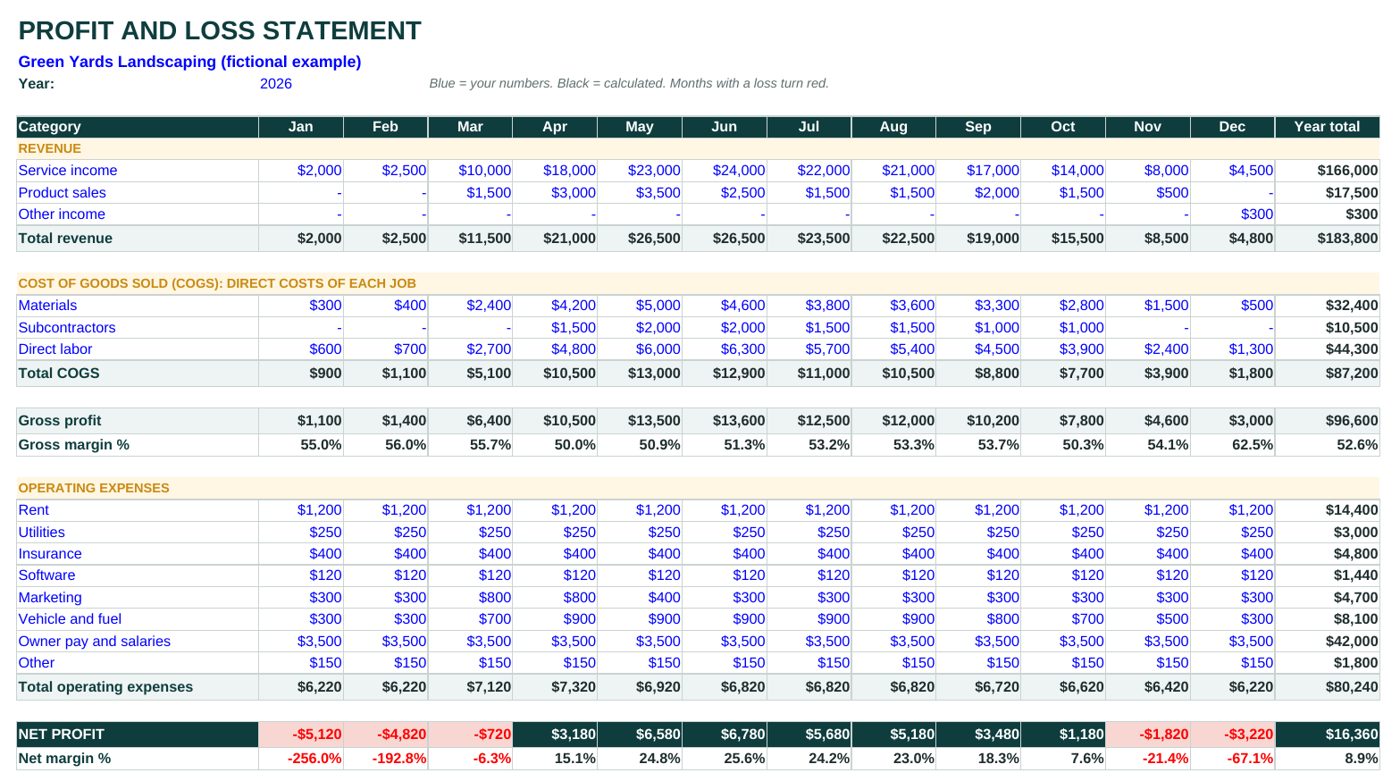
Get the free guide ↓No email required. The Excel and Google Sheets versions cover 12 months plus a year total. Every total and both margins calculate on their own, and any month with a loss turns red. The PDF and Word versions are blank, for printing and filling in by hand.
What's Inside the Template
- Revenue: service income, product sales and other income.
- Cost of goods sold (COGS): materials, subcontractors and direct labor, the costs you only have because you did the work.
- Gross profit and gross margin %: what's left from your revenue after the direct costs of each job.
- Operating expenses: rent, utilities, insurance, software, marketing, vehicle and fuel, owner pay and salaries, and other.
- Net profit and net margin %: what's left after everything.
- A year total for every line, and a red alert on any month with a loss.
Rename the categories to fit your business. The formulas in the total rows keep working.
Example: A Filled Profit and Loss Statement
Here's June for Green Yards Landscaping (fictional example), the business already filled in the template:
| June | |
|---|---|
| Service income | $24,000 |
| Product sales | $2,500 |
| Total revenue | $26,500 |
| Materials | $4,600 |
| Subcontractors | $2,000 |
| Direct labor | $6,300 |
| Total COGS | $12,900 |
| Gross profit | $13,600 |
| Gross margin | 51.3% |
| Rent, utilities, insurance, software | $1,970 |
| Marketing, vehicle and fuel, other | $1,350 |
| Owner pay and salaries | $3,500 |
| Total operating expenses | $6,820 |
| Net profit | $6,780 |
| Net margin | 25.6% |
The full year tells a different story. Green Yards makes good money from April to October, then loses money in the five quieter months. The year still ends with $16,360 of net profit on $183,800 of revenue, an 8.9% net margin. Without a monthly P&L, a winter like that can feel like the business is failing.
For a landscaping business, revenue starts with good quotes. If that's you, see the landscaping estimate template.
How to Make a Simple Profit and Loss Statement
Open a spreadsheet with one column per month. List income at the top, then the direct costs of each job, then operating expenses like rent and software. Subtract costs from revenue for gross profit, subtract expenses for net profit, and divide each by revenue to get your margins. The template already does this for you.
1. Pick your period (monthly)
Monthly is the sweet spot for a small business: often enough to catch problems early, rare enough that it only takes about 20 minutes. Do it in the first week of the next month.
2. Gather bank statements, invoices and receipts
Use what you invoiced (or what was paid, if you keep things on a cash basis) for revenue, and your bank and card statements for costs. If your quotes and invoices are organized, this step is quick; the quote template helps with that.
3. Put each cost in the same category every month
The value of a P&L comes from comparing months. If fuel is "vehicle" in March and "other" in April, the comparison breaks. When you're unsure, pick a category and stick to it.
4. Check your margins at the end of the month
Look at two numbers first: gross margin (are your prices covering the job?) and net margin (is anything left?). Then look for the line that moved the most.
Want 5 quick fixes you can set up this week? Get the free 5 Quick Wins guide ↓
How to Calculate Profit Margin
Gross margin is gross profit divided by revenue; net margin is net profit divided by revenue. Multiply by 100 for a percentage. If you earned $10,000 and kept $1,500 after all costs and expenses, your net margin is 15%. Both tell you different things, so track both every month.
- Gross margin = gross profit ÷ total revenue. Green Yards in June: $13,600 ÷ $26,500 = 51.3%.
- Net margin = net profit ÷ total revenue. Green Yards in June: $6,780 ÷ $26,500 = 25.6%.
What counts as a "good" margin depends on your trade, your location and how you pay yourself. Instead of chasing a number from someone else's business, watch your own trend: a gross margin that holds steady or rises month after month means your pricing is keeping up with your costs.
What Does a Good Profit and Loss Statement Look Like?
A good profit and loss statement separates revenue, the direct cost of delivering your work and your operating expenses, month by month. It shows gross and net profit, plus both margins, so you can see at a glance whether prices cover costs and whether expenses are growing faster than sales.
Signs your P&L is doing its job:
- Revenue and costs are split into categories you use the same way every month.
- Gross margin is steady or rising from month to month.
- Expenses grow more slowly than revenue.
- There are few months in the red, and you know why each one happened (like winter for Green Yards).
Profit vs Cash Flow: What's the Difference?
Profit is what's left on paper after costs and expenses. Cash flow is when money actually comes in and goes out of your bank account.
Say you finish a $9,000 job in June and the customer pays in 60 days. Your June P&L shows the profit, but the cash only arrives in August, while you still pay your crew and suppliers in June and July. A profitable business can still run short of cash. That's why it helps to keep a simple cash flow forecast next to your P&L.
How to Use AI to Read Your P&L
Once you have a few months filled in, an AI assistant (ChatGPT, Claude, Gemini or Copilot) can help you spot patterns. Before you paste anything, remove customer names, account numbers and anything else private.
Here is my monthly profit and loss for the last [X] months. Act as a small business advisor.
1) Which expenses grew faster than revenue?
2) In which months did my gross margin drop, and what could explain it?
3) List 3 questions I should ask myself before my next pricing decision.
Do not invent numbers; use only the data below.
[paste your P&L here]
Use the answers as questions to think about, not as decisions. You know your business; the AI only sees the numbers.
Frequently asked questions
Is there a P&L template in Excel?
Yes. Excel includes some built-in templates, and many sites offer free ones. This one was made for small service businesses: it splits direct job costs from overhead, calculates both margins automatically and turns any month with a loss red.
Can I create my own P&L statement?
Yes. A simple spreadsheet like this one is enough to start, and it's how many small businesses track profit month to month. For taxes, depreciation or loans, ask an accountant how to treat each item. The SBA also has practical advice on understanding your business finances.
How often should I update my profit and loss statement?
Monthly works best for most small businesses. Fill it in during the first week of each month, using the previous month's invoices and statements, and compare it with the month before.
What's the difference between a P&L and a balance sheet?
A P&L shows how much you earned and spent over a period, like a month or a year. A balance sheet is a snapshot of what the business owns and owes on one day: cash, equipment, loans and what customers still owe you.
Not ready for the kit? Get 5 free quick wins.
Five small fixes you can set up this week, with step-by-step walkthroughs and ready-to-copy prompts. Free, by email.
Want to see your numbers without the spreadsheet stress?
This template comes from The AI Money Manager, book 4 of the AI for Small Business series. The book comes with the Money Dashboard, a spreadsheet that tracks invoices, expenses, prices and a 13-week cash plan in one place, plus prompts that help you read it. It's included in both the Essentials and the Complete Kit (the Google Sheets version comes with the Complete Kit), with a 30-day money-back guarantee.
See the full kit · or start with the free 5 Quick Wins guide